

Pinterest GIF Downloader
Paste an animated Pinterest Pin link to find the available animated media.
Pinterest Media
Pinterest GIF Downloader – Save Animated Pins Online
ClipToDown Pinterest GIF Downloader helps you find downloadable animations from supported public Pinterest Pins. Simply copy a Pin URL, paste it into the tool above, and check whether an animated GIF file is available.
Our free Pinterest GIF download tool gives you a simple way to save moving pictures for offline viewing. It works in your browser, so there is no need to install a separate GIF downloading application.
What Is a Pinterest GIF Downloader?
A Pinterest GIF downloader is an online service that helps users locate and save animated GIF files from supported Pinterest posts. GIFs are short, looping animations commonly used for reactions, creative ideas, and visual inspiration.
With ClipToDown, you can check public Pin links for supported animated media without manually searching through source files. The tool displays download options when they are available, making it easier to keep animations you own or have permission to save.
Features of Our Pinterest Animated GIF Downloader
Save Animated Pinterest Pins
Check supported public Pinterest posts for downloadable moving images and GIFs.
Original GIF Format
Download an animated GIF when the original Pin provides a supported GIF file.
Easy Link Processing
Paste the public Pinterest URL and view available animated media results.
No Extra App Needed
Use the Pinterest GIF saver with a compatible browser on mobile or desktop.
How to Download GIFs from Pinterest
Use these four simple steps to check and download supported Pinterest GIF animations.
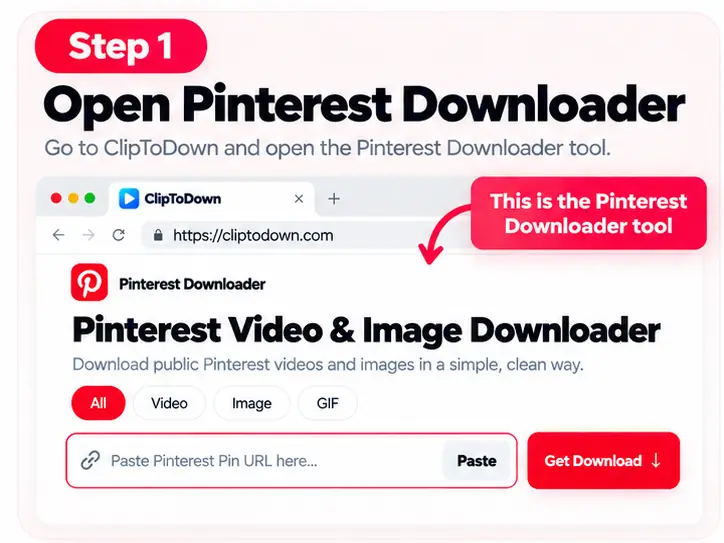
Open the Pinterest GIF Tool
Visit the Pinterest downloader above and keep your Pin link ready.
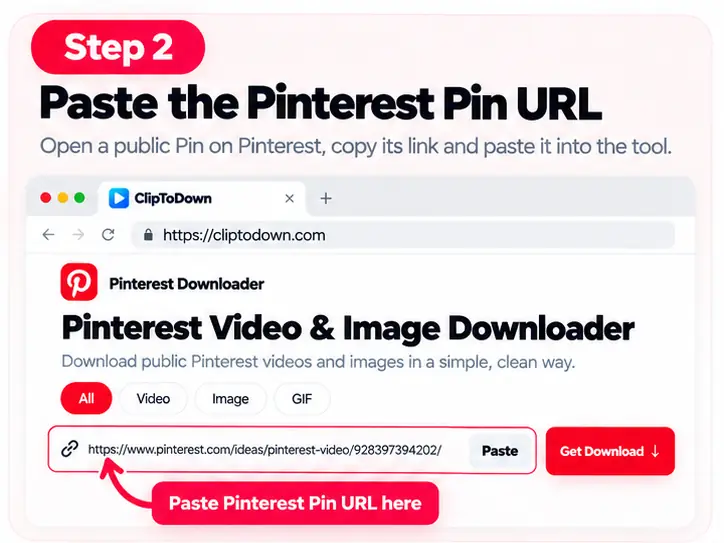
Paste Your Pinterest Pin URL
Copy the link of a public animated Pin and insert it into the URL box.
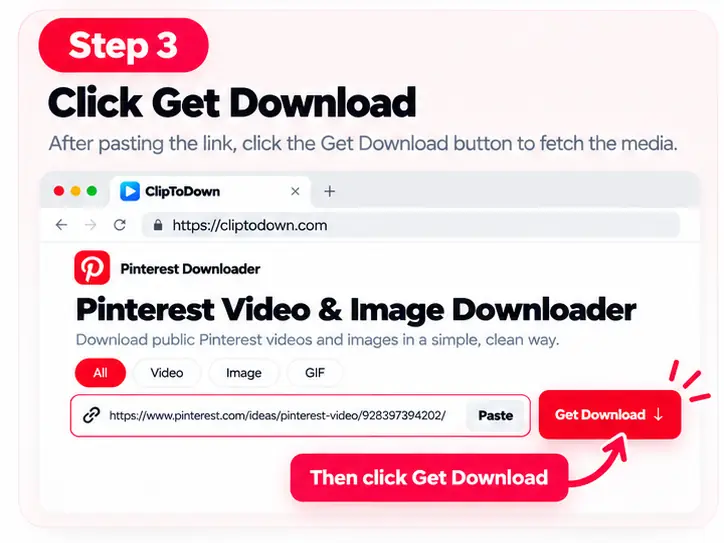
Choose GIF and Get Download
Select the GIF option and click Get Download to check available animated files.
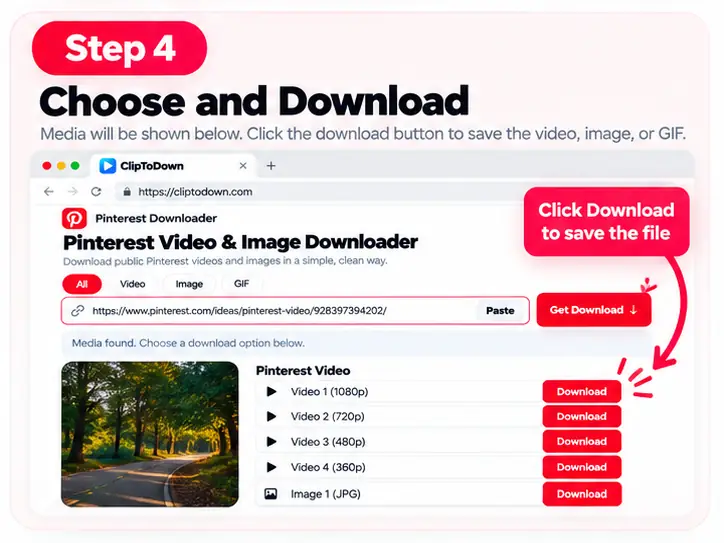
Save the Available Animation
Choose a supported GIF download result and save it to your device.
Download Pinterest GIF Images in Available Formats
Not every moving image on Pinterest is stored as a GIF. Some animated Pins use video formats instead. Our Pinterest animated image downloader displays supported media options found in the original public Pin.
If a GIF file is available, you can select it from the download results. File size, animation quality, and format depend on the original media. The tool does not automatically convert every Pinterest video into a GIF.
Save Pinterest GIFs on Phone, Tablet, or PC
The ClipToDown Pinterest GIF saver works through compatible browsers on Android, iPhone, Windows, Mac, and tablets. You can check available animated media without installing a browser extension or an additional application. Saving behavior can vary by device and browser.
FAQs About Pinterest GIF Downloader
Here are answers to common questions about saving Pinterest GIFs online.
Is Pinterest GIF Downloader free to use?
Yes. The tool provides free access to basic GIF download options for supported public Pinterest Pins.
How can I download a GIF from Pinterest?
Copy the public animated Pin URL, paste it into the downloader, select GIF, and click Get Download. Save an available GIF result if one is provided.
Can I save Pinterest GIFs on my iPhone?
You can use a compatible iPhone browser to check available GIF downloads. The way animated files are saved may depend on your browser and device.
Does Pinterest GIF Downloader work on Android?
Yes. Open the tool in an Android browser, paste a supported Pinterest link, and select an available download option.
Can I download Pinterest GIFs without an account?
You do not need to sign in through the downloader when using supported, publicly accessible Pinterest Pin links.
Why is my Pinterest GIF not downloading?
The Pin might be private, removed, restricted, or stored in another format. Check the URL and confirm the original Pin is publicly accessible.
Will a downloaded Pinterest GIF keep moving?
When the downloaded file is an actual animated GIF, its animation should remain intact in applications that support GIF playback.
Can I convert Pinterest videos into GIFs with this tool?
The downloader checks the available source formats. It does not automatically turn every Pinterest video into an animated GIF.