

Pinterest Video Downloader
Paste a public Pinterest Pin link to find available video files.
Pinterest Media
Pinterest Video Downloader – Save Videos Online
ClipToDown Pinterest Video Downloader helps you save supported Pinterest videos using their public Pin links. Simply copy a Pinterest video URL, paste it into the downloader above, and choose an available download option.
Our free Pinterest video download tool makes saving videos simple. Whether you are using a mobile phone or computer, you can download available Pinterest clips directly through your browser without installing another application.
What Is Pinterest Video Downloader?
A Pinterest Video Downloader is an online tool that helps users save video content from publicly accessible Pinterest Pins. Instead of recording your screen, you can use a supported Pin URL to check the original video download options.
With ClipToDown, you can download public Pinterest videos in a few simple steps. The tool provides a clean interface that helps you find available video formats without installing extra software.
Features of Our Pinterest Video Downloader
Download Pinterest Videos
Save supported public Pinterest video Pins using their original links.
Available MP4 Formats
Use our Pinterest MP4 downloader to save videos when MP4 files are available.
Video Quality Options
Choose from available source qualities, including HD when supported.
Browser-Based Downloader
Download videos online through compatible desktop and mobile browsers.
How to Download Pinterest Videos
Follow these four steps to save supported Pinterest videos with the downloader above.
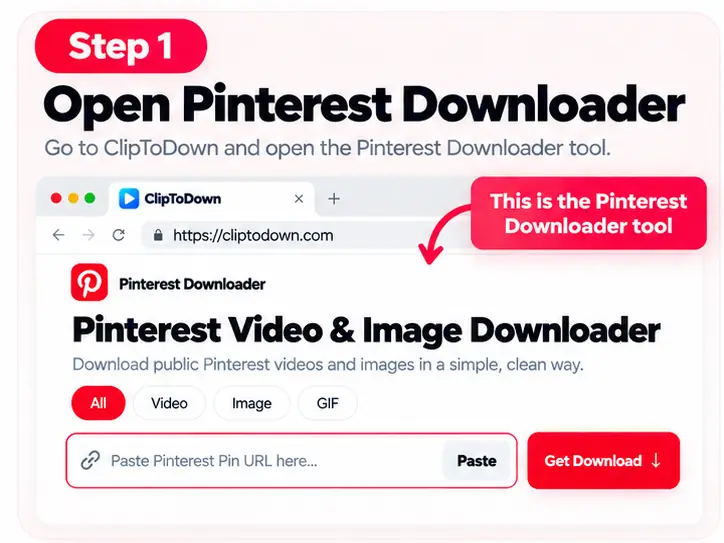
Open Pinterest Downloader
Find the Pinterest video downloading tool above.
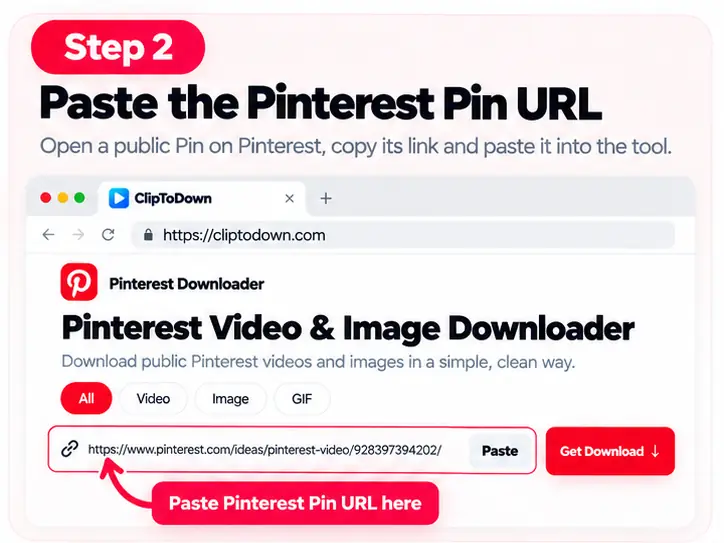
Paste the Pinterest Video URL
Copy a public video Pin link and paste it into the input field.
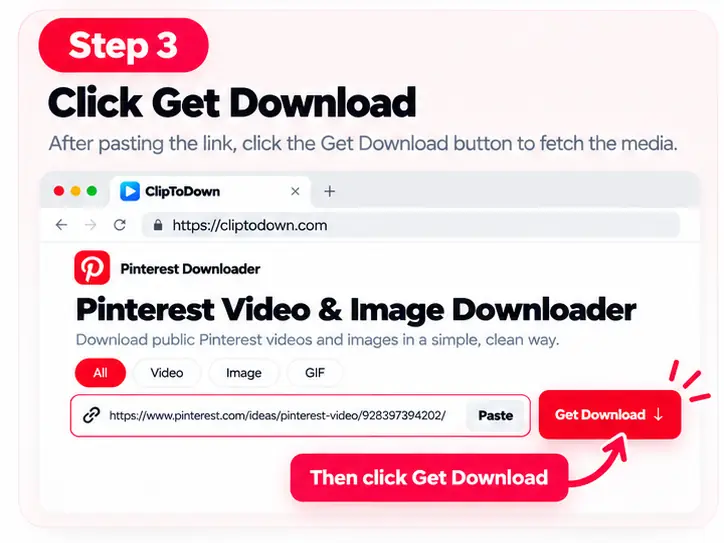
Get Video Download Options
Select Video and click Get Download to check the available files.
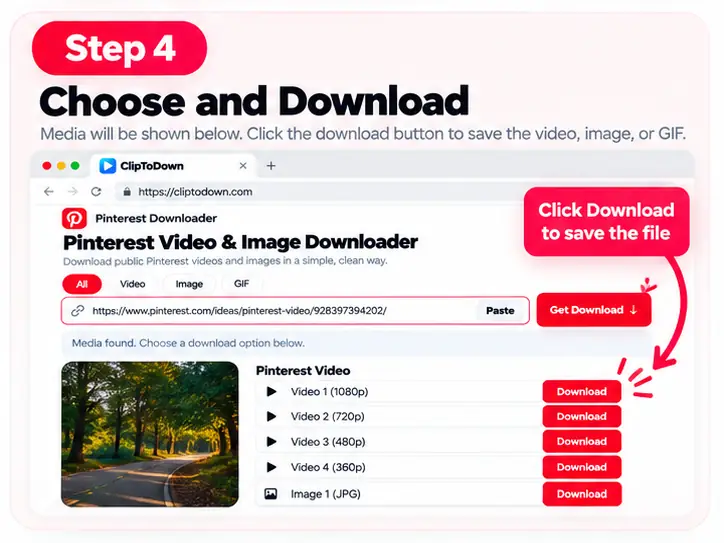
Save Your Pinterest Video
Choose an available video result and click Download to save it.
Download Pinterest Videos in MP4 and Available Quality
ClipToDown allows you to check available Pinterest MP4 and HD video download options. Video quality depends on the original source, so you can select the best available format for your device.
If an HD version is available, you can select it from the results. The downloader cannot improve the original video resolution, so the final quality depends on the uploaded media.
Save Pinterest Videos on Mobile and Computer
Our online Pinterest video saver works through compatible browsers on Android, iPhone, Windows, Mac, and tablets. You can access the downloader without installing a separate application. Saving options may vary by browser.
FAQs About Pinterest Video Downloader
Find helpful answers about downloading Pinterest videos online.
Is Pinterest Video Downloader free?
Yes. The tool provides free access to basic Pinterest video downloading features.
How do I download a Pinterest video online?
Copy a public Pinterest video Pin URL, paste it into the tool above, and click Get Download. Choose an available video file to save.
Can I download Pinterest videos in MP4?
MP4 downloads may be available depending on the original video and the formats provided by the source.
Can I save Pinterest videos in HD quality?
HD video options may be available when the original Pinterest video supports higher-resolution downloads.
Does Pinterest Video Downloader work on iPhone?
Yes. You can access the tool through a compatible iPhone browser and use the available video-saving options.
Can I download Pinterest videos on Android?
Yes. Open the downloader in an Android browser, paste a supported Pin link, and choose the available video download.
Do I need a Pinterest account to save videos?
No account login is required for supported public Pinterest Pin URLs.
Why is my Pinterest video not downloading?
The Pin may be private, removed, restricted, or unsupported. Check the public Pin URL and try another available video.